You know the words.
Now say them out loud.
Freezing on frequency has one fix: having said it before. PilotSpeak puts you on the radio, answers back, and tells you straight away what you left out.

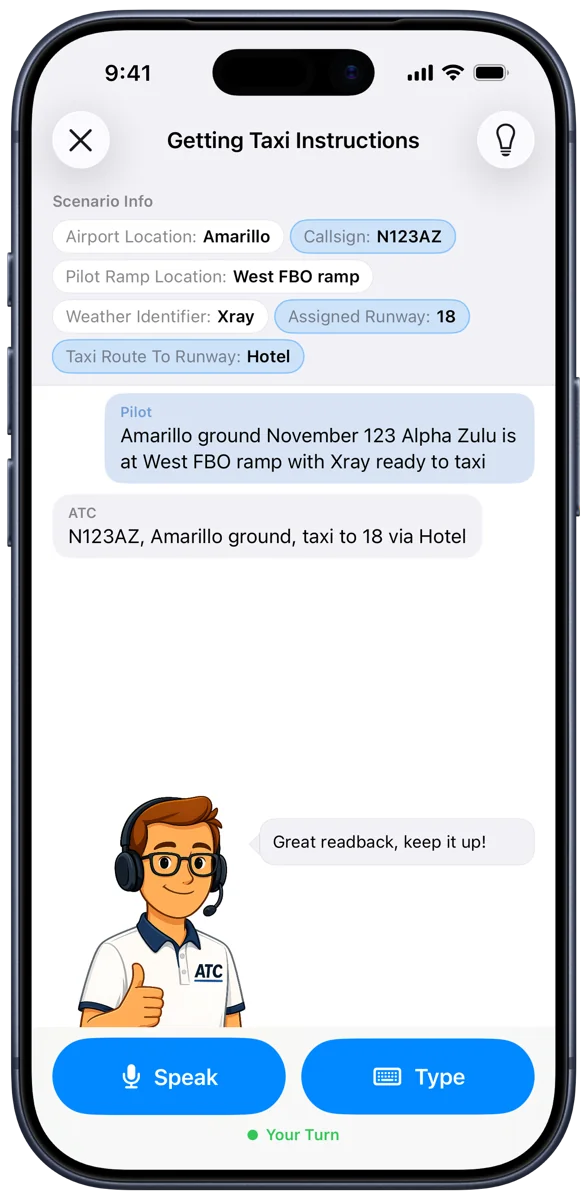
Four steps, then you are on frequency
Set it up once, then it is the same loop every time: pick a call, say it, find out.
Set up your aircraft
Your callsign and your home field, once. Every call after that uses your tail number and your field's real runways and frequencies.
Pick a call
44 of them, laid out in the order a flight happens — ground, departure, enroute, arrival, uncontrolled fields, IFR, and the ones that go wrong.
Key the mic
Say it the way you would on frequency. The app listens for real — no multiple choice, no tapping the right answer.
Find out immediately
Right, and you move on. Wrong, and you are told exactly which item you left out, then given the phrasing to copy.
Reading it back in your head is not practice.
Nobody ever got fluent on frequency by recognising the right answer. PilotSpeak grades what actually comes out of your mouth — callsign, position, request and all.
- A speech model built around your callsign and field
- Type the call instead when you can't talk out loud
- Everything you were given stays on screen

Ordered the way a flight happens.
Not difficulty tiers — phases. You work from the ramp to the runway, out to the enroute frequencies and back down again, and Home shows you which part of a flight you have never practised.
- Every call written from the FAA's own publications
- Towered fields, uncontrolled fields and IFR
- Each call says how many items you must read back

The controller answers. Every single time.
Drop your callsign and you will hear about it — then get the exact phrasing to copy. Get it right and you will know that too.


44 calls, ramp to ramp
Two from each phase of flight. The rest are in the app.
Questions, answered
Do I need a pilot licence to use PilotSpeak?
No. Student pilots use it before their first radio call; licensed pilots use it to stay sharp, or to walk into unfamiliar airspace having already said the words once.
Do I really have to speak out loud?
Speaking is the whole point — that is what makes the nerves go away. But every call also has a Type option for when you are somewhere you cannot talk out loud.
How does the feedback work?
The app checks your transmission against the correct phraseology for that call, item by item. If something is missing it names it — "you omitted the runway" — and gives you the phrasing to copy. There is an optional short-tempered controller for anyone who would rather be told off than encouraged.
What calls are included?
44, grouped by phase of flight: ground and clearances, getting airborne, enroute, coming back in, uncontrolled fields, IFR, and abnormals. That covers taxi and hold-short instructions, land and hold short, line up and wait, pattern work, CTAF self-announcing, flight following, airspace transitions, go-arounds, traffic advisories, holds and approaches, the missed approach, lost communications, minimum fuel and emergencies.
Where does the content come from?
Every call is written from public-domain FAA publications — the Aeronautical Information Manual, the Pilot/Controller Glossary, FAA Order JO 7110.65 and Advisory Circular 90-66C. Each one names the paragraph it came from, on the setup screen, so you can go and read the source.
Does it work at my airport?
Yes. Pick your home field during setup and the calls use its real runways, taxiways and published frequencies, along with your own callsign — rather than a generic trainer at a generic airport.
Is it available on Android?
Not yet. PilotSpeak is currently available exclusively on the App Store for iPhone and iPad.
Is this a substitute for real flight training?
No. PilotSpeak is a practice tool for radio phraseology and confidence. It does not replace instruction from a certificated flight instructor, and it is not connected to real air traffic control.
Key the mic with confidence
Start practicing today — the frequency won't feel so busy tomorrow.